![Filmhub_Logotype_Neg.png]](https://help.filmhub.com/hs-fs/hubfs/Filmhub_Logotype_Neg.png?height=25&name=Filmhub_Logotype_Neg.png)
In this guide:
- What is the Schedule?
- How do I read the Schedule?
What is the Schedule?
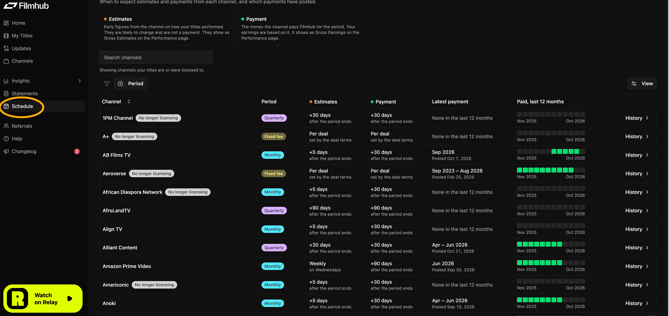
We list each Channel your title is listed on, along with its respective reporting and payment details, in the Schedule tab on your Dashboard.
Using the Schedule to Understand When Performance Reports Are Posted
How do I read the Schedule?
Payment dates come straight from our payment records, so a payment shows up as soon as we receive it.
- Period: The Watch Period the Channel’s report covers. Some Channels report monthly and others quarterly.
- Estimates: When we expect the Channel to send initial performance estimates, shown as days after the Watch Period ends. Once we receive a report, we upload it to Performance within 5 business days.
- Payment: When we expect the Channel to pay, shown as days after the Watch Period ends
- Latest Payment: When we received the Channel’s most recent payment for that report, shown as days after the Watch Period ends.
- Paid, last 12 months: The date we received the Channel's most recent payment.
- History: Click this to see the recent dates the Channel paid.
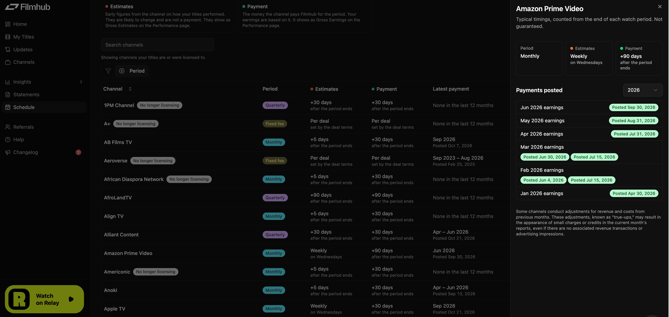
Please note: Channels are sometimes late in their reporting and payment. Filmhub has an entire team dedicated to acting as your collections agent for Channels. We are equally aligned here as we only get paid when you get paid.