---
title: "Insights: Performance"
description: The Performance page transparently displays your title’s reports and earnings and gives you tools to analyze earnings trends.
---
[Skip to content](https://help.filmhub.com/performance-analyzing-your-performance#main-content)
English
Show submenu for translations
![Filmhub\_Logotype\_Neg.png\]](https://help.filmhub.com/hs-fs/hubfs/Filmhub_Logotype_Neg.png?height=25&name=Filmhub_Logotype_Neg.png)
Open main navigation
Close main navigation
- English
Show submenu for translations
- Login/Get Started
Login/Get Started
How can we help?
- There are no suggestions because the search field is empty.
1. [Help Center](https://help.filmhub.com/?hsLang=en)
2. [Filmhub Dashboard](https://help.filmhub.com/filmhub-dashboard?hsLang=en)
3. [Dashboard Pages](https://help.filmhub.com/filmhub-dashboard?hsLang=en#dashboard-pages)
# Insights: Performance
## Plus and Pro Subscriber Exclusive: Visualize your estimates in one place, compare them with earnings, and drill down into your data.
### In this guide:
1. [Overview](https://help.filmhub.com/performance-analyzing-your-performance#Overview)
2. [Understanding your data](https://help.filmhub.com/performance-analyzing-your-performance#Understanding-your-data)
3. [Useful terms](https://help.filmhub.com/performance-analyzing-your-performance#Useful-terms)
4. [Reading the Performance Page](https://help.filmhub.com/performance-analyzing-your-performance#reading-the-performance-page)
5. [Filters](https://help.filmhub.com/performance-analyzing-your-performance#Filters)
6. [Additional controls](https://help.filmhub.com/performance-analyzing-your-performance#Additional-controls)
7. [Percentile](https://help.filmhub.com/performance-analyzing-your-performance#Percentile)
8. [Detail pane](https://help.filmhub.com/performance-analyzing-your-performance#Detail-pane)
9. [Panels](https://help.filmhub.com/performance-analyzing-your-performance#Panels)
10. [Home Page](https://help.filmhub.com/performance-analyzing-your-performance#home-page)
---
### Overview
The **Performance** page is an exclusive feature for Filmhub Plus and Pro clients that gives a centralized view of how your titles are performing.
It gives you a monthly overview of how your titles are performing in terms of gross estimates from channels.
You can compare these estimates with gross earnings as they are paid out; filter your data by title, channel, country, or genre; or focus on a specific date range.
### Understanding your data
The Performance page displays gross estimates based on reports Filmhub receives directly from Channels.
Because every Channel operates on its own reporting schedule:
- Reports from different channels all arrive on different schedules
- Initial reports may be preliminary.
- Reported amounts can change as Channels refine their calculations.
- It can take several weeks or months for estimates to become final.
You can toggle **Gross Earnings** on to see earnings alongside your gross estimates to see which channel payments are outstanding.
Gross earnings represent the total amount Filmhub has collected on your behalf for the selected period. For a more detailed view of your actual transactions and earnings, visit the [**Statements page**](https://app.filmhub.com/statements). You can also access Statements directly from the Performance page by clicking an individual amount in the chart's Detail Pane.
> **Why show estimates if they're not final?** Channel data isn't perfect, but it provides valuable, timely insight into how your titles are performing. Filmhub makes this data available as soon as we receive it so you can use it to inform your marketing and distribution decisions.
### Useful terms
- **Gross estimates:** Your expected total earnings, based on the latest estimates Filmhub has received from channels. **This is a preliminary value and is likely to be adjusted until all channels have finished paying out earnings.**
- **Gross earnings:** The total amount FIlmhub has collected on your behalf, before Filmhub’s revenue share and any other deductions are subtracted.
- **Percentile:** How your titles stack up against the full Filmhub catalog. For example, a title in the 80th percentile has outperformed 80% of all titles distributed by Filmhub.
- **Last updated at:** The Filmhub team receives reports directly from channels, processes the data, and updates your performance page at regular intervals. The estimates and earnings shown reflect all available data as of the time displayed here.
- **Schedule:** Channels each report estimates and pay out earnings at different times. This can lead to fluctuations in both estimates and earnings over time. You can see this information in greater detail on the [Schedule page.](https://app.filmhub.com/schedule)
### Reading the Performance Page
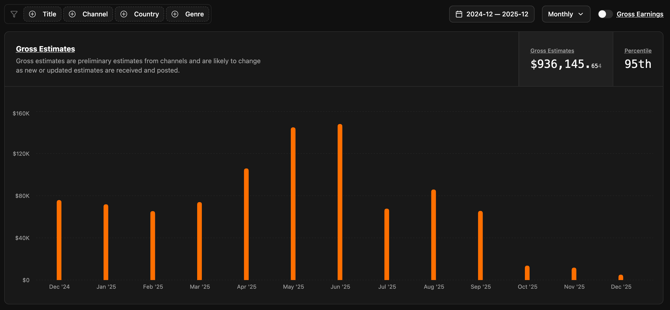
Visualize your gross estimates over time and toggle on gross earnings to compare estimates with actual amounts collected. By default, the chart displays the sum of gross estimates for all your titles from all channels globally.
### Filters
In the top left of the page, you’ll find a set of filters that allow you to focus in on specific data and comparisons. Use filters, date ranges, and toggles to focus on the data you want to analyze.
- **Title:** Choose which title or titles you want to see the performance for.
- **Channel:** See how your titles are performing on specific channels.
- **Country:** See how your titles are performing in specific countries.
- **Genre:** See how your titles in specific genres are performing.
### Additional controls
In the top right, you have three more controls:
- **Period:** Choose whether you want to see your performance by month or quarter.
- **Date range:** Narrow down the date range to see performance over a specific time period.
- **Gross Earnings:** Enable this toggle switch to see gross earnings against your gross estimates. Read the [Understanding your data](https://help.filmhub.com/performance-analyzing-your-performance?hsLang=en#Understanding-your-data) section above before enabling this.
.png?width=670&height=27&name=image%20(24).png)
### Percentile
Toggle Percentile in the top right of the chart to see how your titles stack up to everything else on Filmhub. If you’re in the 85th percentile, for example, you’ve outperformed 85 percent of Filmhub titles by that metric.
### Detail pane
Click on any of the chart’s bars to open a new window with a more detailed breakdown of estimates and earnings from that month.
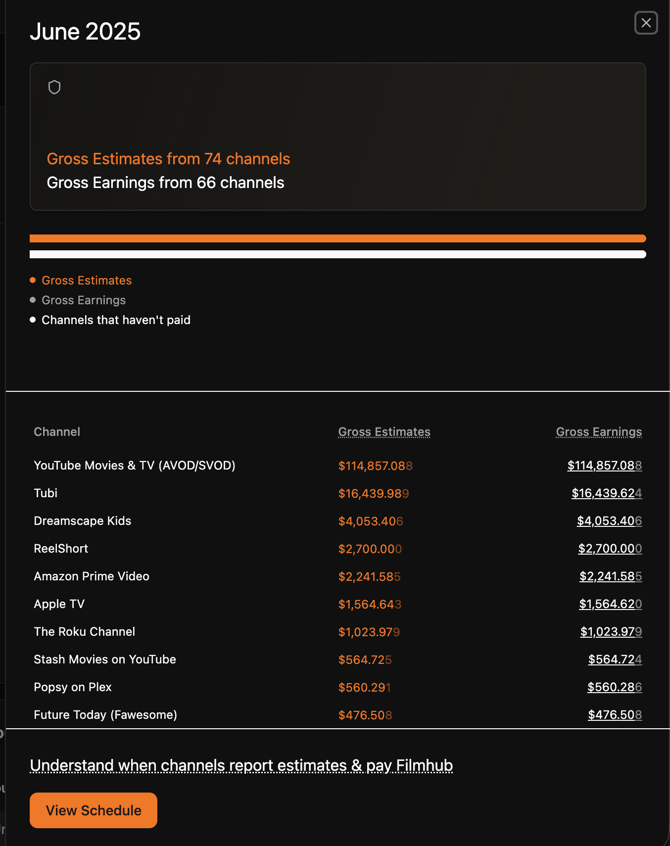
Here you can see:
- Which channels are yet to pay, and how much has been received from those that have
- Gross estimates per channel
- Gross earnings per channel.
At the bottom of the detail pane is a link to see the payment schedule, this will give you an overview of when you can expect to be paid by each channel.
### Panels
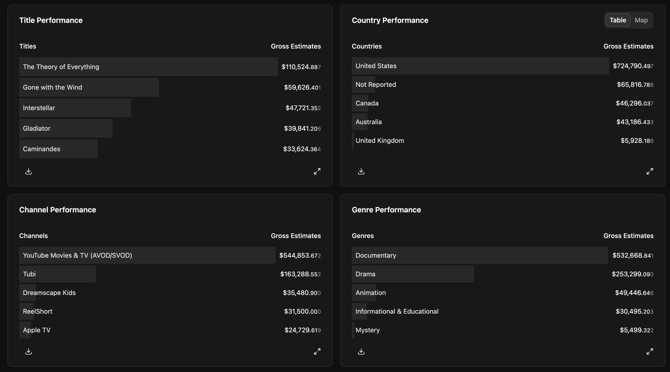
The panels give you a ranked overview of performance for the selected time period by title, channel, country, and genre.

At the bottom of the page, you’ll find four panels that provide a different look at your data.
- **Title Performance:** Get an overview of how individual titles are performing relative to one another.
- **Channel Performance:** See how your estimates from individual channels compare to one another.
- **Country Performance:** See your estimates for the selected period broken down by country, use the toggle in the top right to see these displayed on a map.
- **Genre Performance:** If you have titles in multiple genres, the panel gives you a per-genre breakdown of your estimates.
### Home page
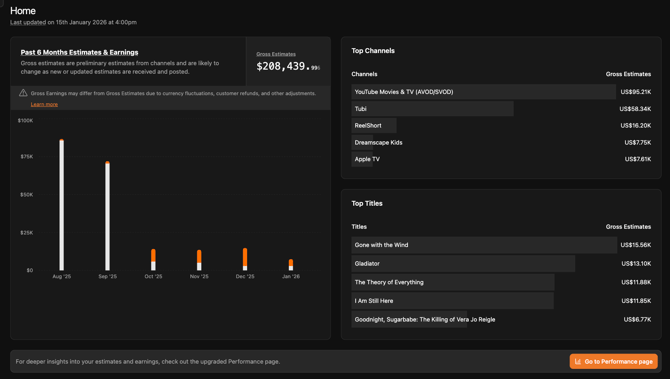
Just need a quick overview? The home page of your Filmhub Dashboard contains a streamlined view of performance data. This is available to all clients, regardless of Plan. Here, you’ll find:
- A chart with:
- The past six months of gross estimates
- The past six months of gross earnings
- Your total gross estimates for this period
- A ranked overview of your top channels, by gross estimates, for the past six months.
- A ranked overview of your top titles, by gross estimates, for the past six months.
- [Filmhub Overview](https://help.filmhub.com/filmhub-overview?hsLang=en#main-content)
- [Start Your Filmhub Journey](https://help.filmhub.com/filmhub-overview?hsLang=en#start-your-filmhub-journey)
- [Understand Our Services](https://help.filmhub.com/filmhub-overview?hsLang=en#understand-our-services)
- [Filmhub Dashboard](https://help.filmhub.com/filmhub-dashboard?hsLang=en#main-content)
- [Dashboard Pages](https://help.filmhub.com/filmhub-dashboard?hsLang=en#dashboard-pages)
- [Title Submission Steps](https://help.filmhub.com/filmhub-dashboard?hsLang=en#title-submission-steps)
- [Features & Tools](https://help.filmhub.com/filmhub-dashboard?hsLang=en#features-tools)
- [Filmhub's Distribution Strategies](https://help.filmhub.com/filmhubs-distribution-strategies?hsLang=en)
- [Guides & Resources](https://help.filmhub.com/guides-resources?hsLang=en#main-content)
- [Submitting Your Title](https://help.filmhub.com/guides-resources?hsLang=en#submitting-your-title)
- [Filmhub Requirements and Fixes](https://help.filmhub.com/guides-resources?hsLang=en#filmhub-requirements-and-fixes)
- [Best Practices](https://help.filmhub.com/guides-resources?hsLang=en#best-practices)
- [Catalog Import Program](https://help.filmhub.com/guides-resources?hsLang=en#catalog-import-program)
- [FAQs](https://help.filmhub.com/guides-resources?hsLang=en#faqs)
- [Our Recent Subscription Changes: FAQs](https://help.filmhub.com/guides-resources?hsLang=en#our-recent-subscription-changes-faqs)
- [Resources for Rights Holder](https://help.filmhub.com/resources-for-rights-holder?hsLang=en#main-content)
- [Marketing](https://help.filmhub.com/resources-for-rights-holder?hsLang=en#marketing)
- [Resources for Channels](https://help.filmhub.com/resources-for-channels?hsLang=en#main-content)
- [Getting Started](https://help.filmhub.com/resources-for-channels?hsLang=en#getting-started)
- [Finding and Licensing Titles](https://help.filmhub.com/resources-for-channels?hsLang=en#finding-and-licensing-titles)
- [Delivery](https://help.filmhub.com/resources-for-channels?hsLang=en#delivery)
- [Account Management](https://help.filmhub.com/resources-for-channels?hsLang=en#account-management)
- [Legal](https://help.filmhub.com/legal?hsLang=en)
[](http://filmhub.com)
Copyright © 2026, Filmhub