---
title: "Referrals: earn a stake of any films you refer"
description: The Referrals page allows you to easily invite new clients to partner with Filmhub and earn a share of revenue from their success.
---
[Skip to content](https://help.filmhub.com/referrals#main-content)
English
Show submenu for translations
![Filmhub\_Logotype\_Neg.png\]](https://help.filmhub.com/hs-fs/hubfs/Filmhub_Logotype_Neg.png?height=25&name=Filmhub_Logotype_Neg.png)
Open main navigation
Close main navigation
- English
Show submenu for translations
- Login/Get Started
Login/Get Started
How can we help?
- There are no suggestions because the search field is empty.
1. [Help Center](https://help.filmhub.com/?hsLang=en)
2. [Services and Support](https://help.filmhub.com/services-and-support?hsLang=en)
# Referrals: earn a stake of any films you refer
## How the Filmhub referral program works and what you earn for referring titles.
### In this guide:
- [Note:](https://help.filmhub.com/referrals#note)
- [How referrals work](https://help.filmhub.com/referrals#how-referrals-work)
- [Referral links](https://help.filmhub.com/referrals#referral-links)
- [Email an invitation](https://help.filmhub.com/referrals#email-an-invitation)
- [Invite panel](https://help.filmhub.com/referrals#invite-panel)
---
The **Referrals** page allows you to easily invite new clients to partner with Filmhub and earn a share of revenue from their success.
Navigation: Click **Referrals** on the left-hand menu of your dashboard.
On this page:
- [How referrals work](https://help.filmhub.com/referrals#Howitworks)
- [Referral links](https://help.filmhub.com/referrals#Referrallinks)
- [Email an invitation](https://help.filmhub.com/referrals#Email)
- [Invite panel](https://help.filmhub.com/referrals#Invite)
### Note:
Loading referrals will restart any video currently uploading in your dashboard. Wait until your upload is complete to click referrals.
### How referrals work
Our referrals program opens up a new revenue stream for our clients, letting you capture a back end stake in any film you refer and grow recurring revenue. Now, you not only can make money on your own films, but films you refer.
1. Introduce other producers, distributors, or rights holders to our acquisitions team using your referral code or email an invitation tool.
2. They create an account and upload their title.
3. When they earn revenue, you receive 10% out of Filmhub’s share for the first five years after account creation. Your referral doesn’t impact their earnings, they keep every dollar they’re entitled to, and you get a new revenue stream. It’s a win-win.
Referral income appears on your [Statements](https://help.filmhub.com/statements-transactions-and-transfers?hsLang=en) page under the "Referral" deposit type, and is available as soon as Filmhub is paid. The new client must sign up using your link for you to receive referral income.
For more details, please review our [Terms of Service](https://filmhub.com/terms).
### Referral links

Your referral link is unique. When a new client clicks your referral link they will be taken to Filmhub’s signup page. After they create an account it will be automatically linked to yours through the referral link and appear under **Accepted** in the [**Invites**](https://help.filmhub.com/referrals#Invite) panel below.
Click the referral link to copy it into your clipboard. Then simply paste the referral link into email, text, social media, or YouTube posts. The more you spread the word, the more you earn!
### Email an invitation

The Referrals page features a tool to automatically send an invitation email with your unique referral link. Fill out the recipients first name, last name and email address. Then click **Send Intro**. Referral invitations expire after 90 days.
Emails already associated with a Filmhub account cannot be invited or added to referrals.
### Invite panel
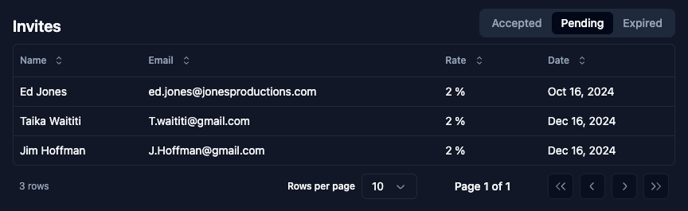
The Invite Panel at the bottom of the page tracks the status of your referrals, including the referred account name, email, referral rate, and date. Rates reflected in the Invite Panel are a percentage of Filmhub's share of revenue.
You can toggle the panel between Accepted, Pending, and Expired.
**Accepted**: When someone you invite creates an account, their appear as an accepted referral. When their accounts start earning revenue, you will begin to receive a share per the terms at the top of the page. Date reflects the account creation date.
**Pending:** All referrals sent using the email tool will appear as pending until the invitee creates an account, or 90 days pass. Date reflects the invitation date.
**Expired:** After 90 days, pending referrals expire. Date reflects the expiration date.
### Related articles
- [Professional Services](https://help.filmhub.com/professional-services?hsLang=en)
- [Beta](https://help.filmhub.com/beta-features?hsLang=en)
### Need more help?
Search the [Help Center](https://help.filmhub.com/?hsLang=en) or [submit a support request](https://help.filmhub.com/contact-support?hsLang=en). Email and chat with our team are included with Premium and Premium Plus. [Compare plans](https://help.filmhub.com/plans?hsLang=en)
- [Getting Started](https://help.filmhub.com/getting-started?hsLang=en#main-content)
- [How Filmhub Works](https://help.filmhub.com/getting-started?hsLang=en#how-filmhub-works)
- [Your Account and Plan](https://help.filmhub.com/getting-started?hsLang=en#your-account-and-plan)
- [Submit Your Title](https://help.filmhub.com/submit-your-title?hsLang=en#main-content)
- [Prepare Your Deliverables](https://help.filmhub.com/submit-your-title?hsLang=en#prepare-your-deliverables)
- [Upload, Submit, and Track](https://help.filmhub.com/submit-your-title?hsLang=en#upload-submit-and-track)
- [Large Catalog Import](https://help.filmhub.com/submit-your-title?hsLang=en#large-catalog-import)
- [Quality Control (QC)](https://help.filmhub.com/quality-control-qc?hsLang=en#main-content)
- [How QC Works](https://help.filmhub.com/quality-control-qc?hsLang=en#how-qc-works)
- [Fix QC Issues](https://help.filmhub.com/quality-control-qc?hsLang=en#fix-qc-issues)
- [Pitching and Licensing](https://help.filmhub.com/pitching-and-licensing?hsLang=en#main-content)
- [How Licensing Works](https://help.filmhub.com/pitching-and-licensing?hsLang=en#how-licensing-works)
- [Avails and Pitching](https://help.filmhub.com/pitching-and-licensing?hsLang=en#avails-and-pitching)
- [Release and Delivery](https://help.filmhub.com/release-and-delivery?hsLang=en#main-content)
- [Release Your Title](https://help.filmhub.com/release-and-delivery?hsLang=en#release-your-title)
- [Marketing Your Title](https://help.filmhub.com/release-and-delivery?hsLang=en#marketing-your-title)
- [Change or Remove a Live Title](https://help.filmhub.com/release-and-delivery?hsLang=en#change-or-remove-a-live-title)
- [Performance and Earnings](https://help.filmhub.com/performance-and-earnings?hsLang=en#main-content)
- [Reports and Insights](https://help.filmhub.com/performance-and-earnings?hsLang=en#reports-and-insights)
- [Getting Paid](https://help.filmhub.com/performance-and-earnings?hsLang=en#getting-paid)
- [Rights and Legal](https://help.filmhub.com/rights-and-legal?hsLang=en)
- [Services and Support](https://help.filmhub.com/services-and-support?hsLang=en)
- [For Channel Partners](https://help.filmhub.com/for-channel-partners?hsLang=en#main-content)
- [Getting Started](https://help.filmhub.com/for-channel-partners?hsLang=en#getting-started)
- [Finding and Licensing Titles](https://help.filmhub.com/for-channel-partners?hsLang=en#finding-and-licensing-titles)
- [Delivery](https://help.filmhub.com/for-channel-partners?hsLang=en#delivery)
- [Account Management](https://help.filmhub.com/for-channel-partners?hsLang=en#account-management)
[](https://filmhub.com/)
Copyright © 2026, Filmhub