![Filmhub_Logotype_Neg.png]](https://help.filmhub.com/hs-fs/hubfs/Filmhub_Logotype_Neg.png?height=25&name=Filmhub_Logotype_Neg.png)
The Roku Channel Insights gives you a detailed, visual breakdown of how your titles are performing on The Roku Channel, so you can see what's working, where your audience is watching, and how to make smarter decisions about your catalog. The Roku Channel Insights are currently only available for Plus and Pro Plan Subscribers.
How to find it:
- Navigate to your Dashboard
- Click Insights in the left-hand menu of your dashboard.
- Select The Roku Channel from the drop-down menu.
Page Contents
- Overview
- Chart
- Panels and Filters
- The Panels in Detail
- Estimates vs. Final Statements
- Frequently Asked Questions
Please note that, like any other earnings or performance reports furnished to you, The Roku Channel reporting data is confidential and sharing your reporting data publicly can result in removal from The Roku Channel and potential legal action.
Overview
The Roku Channel Insights provides detailed analytics on your movie and show's performance on The Roku Channel. Use these insights to:
- Monitor audience engagement over time.
- Identify your top-performing titles and episodes
- Analyze viewer retention with a breakdown of watch durations (0–5 mins, 6–15 mins, 16–30 mins, 30+ mins)
- See where your content performs best by geographic location
The Roku Channel Insights data is updated regularly as we receive it directly from the channel.
Chart
The chart is an at-a-glance view of audience engagement over time.
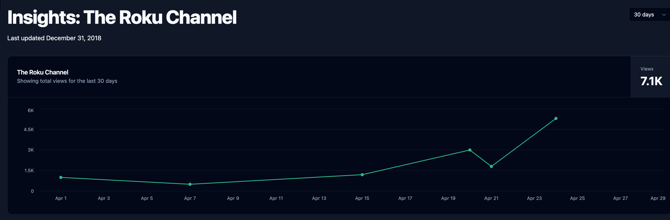
Metrics at the top of the chart show your totals for the selected time period. Click a metric to show it on the chart and all panels below.
Available metrics:
- Views: the total number of views your content has received
Selecting a time period:
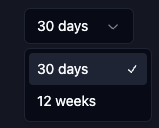
Use the dropdown in the top right to choose a range between 30 days and 12 weeks. The chart will update to show per-day or per-week breakdowns depending on the range you pick. This selection applies to the chart and every panel below it, so you're always looking at a consistent window of data.
Panels
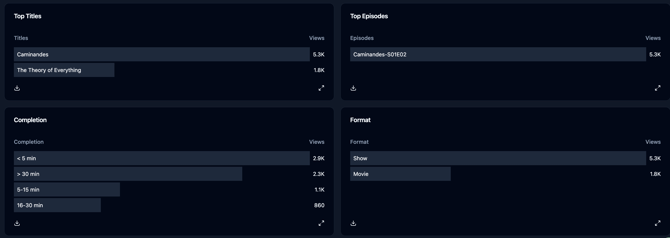
Below the chart, a set of panels break your metrics down into more specific segments, like title, episode, completion, and location.
- Panels initially show your top performing segments for that category.
- Click the expand arrow in the bottom corner of any panel to see all values and search within them.
- Click the download icon in the bottom left of any panel to export that panel's data as a CSV.
Filter
Click any entry within a panel to apply it as a filter for the chart and all panels. This is an easy way to filter your data. The filter is added to the top of the chart, listing all current filters. You can deselect any filter at the top of the Chart to remove your filter and reset the view.
The Panels in Detail
Top Titles
Breaks down your selected metric across your catalog, so you can see how individual titles stack up against each other. Click a title to filter the whole page down to just that title's performance.
Top Episodes
Displays metrics broken down by episode. Click an episode to filter by it.
Completion
A retention breakdown of watch durations (0–5 mins, 6–15 mins, 16–30 mins, 30+ mins). Use this panel to identify potential drop-off points and understand how deeply audiences engage with your content.
Note: Completion data may be unavailable for certain dates or titles, based on Roku's reporting.
Format
Segments the data by show and title.
Estimates vs. Final Statements
The Roku Channel continuously provides estimated data, subject to adjustments and updates over time. These estimates are not actual earnings. These estimates are not actual earnings. To find your estimated earnings or final payouts, refer to the Performance and Statement Pages. Learn more at Schedule: Channel Performance & Payment Timelines.
Frequently Asked Questions
Why don't my Roku Insights numbers match my final statement?
Insights data is made up of continuously updated estimated viewership, not actual earnings. Final statements will always be reflected in your Statements tab. Learn more about Statements.
How often is the data updated?
The Roku Channel Insights data is updated regularly as we receive it from the channel. Because it's estimate-based, small fluctuations between updates are normal and don't necessarily indicate an error.
Can I see historical data older than 12 weeks?
The chart supports time periods between 30 days and 12 weeks. For performance data outside that window, you can find it on your Performance page.
Can I export my data?
Yes. Click the download icon in the bottom left of any panel to export that panel's data as a CSV.
Why can't I see all my titles/episodes in a panel?
Panels initially display only your top segments. Click the expand arrow in the bottom corner of any panel to view and search the full list.
How do I remove a filter I applied?
Any active filters appear at the top of the chart. Click a filter there to deselect and remove it.
Why is Completion data missing for some titles or dates?
Completion data depends on what Roku reports to us, so it may be unavailable for certain dates or titles based on their reporting.
Is "Views" the only metric available?
Currently, Views is the metric available in The Roku Channel Insights. If additional metrics are added in the future, this article will be updated to reflect them.