---
title: "Statements: Detailed Earnings Transactions and Transfers"
description: The Statements page lets you view detailed transactions and transfer your earnings
---
[Skip to content](https://help.filmhub.com/statements-transactions-and-transfers#main-content)
English
Show submenu for translations
![Filmhub\_Logotype\_Neg.png\]](https://help.filmhub.com/hs-fs/hubfs/Filmhub_Logotype_Neg.png?height=25&name=Filmhub_Logotype_Neg.png)
Open main navigation
Close main navigation
- English
Show submenu for translations
- Login/Get Started
Login/Get Started
How can we help?
- There are no suggestions because the search field is empty.
1. [Help Center](https://help.filmhub.com/?hsLang=en)
2. [Filmhub Dashboard](https://help.filmhub.com/filmhub-dashboard?hsLang=en)
3. [Dashboard Pages](https://help.filmhub.com/filmhub-dashboard?hsLang=en#dashboard-pages)
# Statements: Detailed Earnings Transactions and Transfers
## The Statements page lets you view and filter detailed transactions as well as transfer your earnings.
*Navigation: Click **Statements** on the left-hand menu of your Dashboard.*
### **Page Contents:**
- [Overview](https://help.filmhub.com/statements-transactions-and-transfers#Overview)
- [The Transactions List](https://help.filmhub.com/statements-transactions-and-transfers#Transactionslist)
- [Filtering Transactions](https://help.filmhub.com/statements-transactions-and-transfers#Filtering-transactions)
- [Exporting and Downloading Your Statements](https://help.filmhub.com/statements-transactions-and-transfers#Exporting-and-Downloading-Your-Statements)
- [Transfers](https://help.filmhub.com/statements-transactions-and-transfers#Transfers)
- [Negative Balances](https://help.filmhub.com/statements-transactions-and-transfers#Negative-Balances)
- [Frequently Asked Questions](https://help.filmhub.com/statements-transactions-and-transfers#faqs)
---
### Overview
The Statements page gives you full financial transparency and fast access to your revenue. Here's what that means in practice:
- **Maximum transparency:** Full details on every transaction that we receive from the channels.
- **Powerful filtering: Filter** and manage your accounting the way you need.
- **Real-time accounting:** Updated daily as we receive payments from the channels. Learn more about [Schedule: Channel Performance & Payment Timelines](https://help.filmhub.com/en/articles/8365616-schedule-channel-payment-timelines?hsLang=en).
- **Fast payments:** Positive balances can be transferred immediately, with no holdback period.
### The Transactions List
The Transactions List gives you a line-by-line view of every financial transaction in your account. Each row represents one individual transaction.
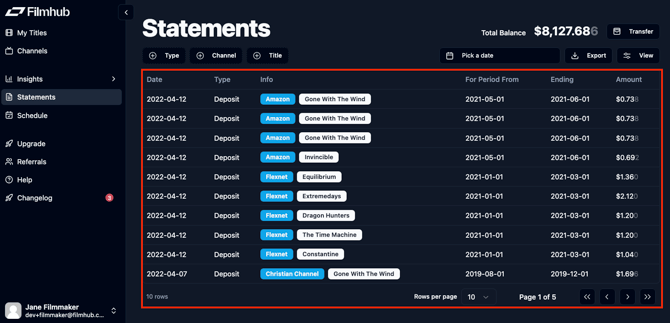
Here's what each column means:
**Date:** The date the financial transaction was posted to your account.
**Type:** The types of transactions are defined as:
- **Deposit:** Earnings received from Channels.
- **Transfer:** Completed transfer requests, including successful, failed, unclaimed, or canceled transfers.
- **Please note:** Transfers initiated *before July 1st* are labeled **Transfer (gross)** and include tax. Transfers initiated *on or after July 1st* are labeled **Transfer (net)**.
- **Reversed transfer:** A transfer that was returned to Filmhub from PayPal.
- **Transfer fee:** The fee PayPal charges to process your transfer. Filmhub does not add anything on top of this. The fee shown at request time is an estimate based on your declared tax country:
- $0.25 for US accounts
- 2% of the transfer amount (up to $20.00) for non-US accounts. ([view PayPal's full fee schedule](https://www.paypal.com/us/business/paypal-business-fees#statement-10).)
- Note: PayPal actually charges based on your PayPal account's country. If that differs from your tax country on file, the fee may vary slightly, and a small reconciling adjustment in your statements if so.
- **Tax withheld:** The amount withheld from your earnings as required by law, based on your tax country. [Learn more here.](https://help.filmhub.com/articles/2663756-tax-withholding?hsLang=en)
- **Adjustment:** Amounts applied toward or against your account by Filmhub. ((for example, a charge for requested [Professional Services](https://help.filmhub.com/professional-services?hsLang=en))
- **Referral:** Payments received from [referral](https://help.filmhub.com/referrals?hsLang=en) agreements.
**Info:** Shows the Channel and title associated with the transaction, plus any additional context.
- **Success:** The transfer has been deposited into your connected PayPal account.
- **Failed:** The transfer was not successfully deposited.
- **Unclaimed:** Troubleshoot with [PayPal](https://www.paypal.com/sg/cshelp/article/why-is-the-payment-ive-sent-pending-or-unclaimed-can-i-cancel-it-help111#:~:text=If%20a%20payment%20you've,to%20a%20verified%20PayPal%20account). If you are still experiencing issues, contact [support@filmhub.com](mailto:support@filmhub.com).
**For Period From:** The start of the Reporting Period the payment covers.
**Ending:** The end of that Reporting Period.
**Amount:** The total earnings included in the transaction.
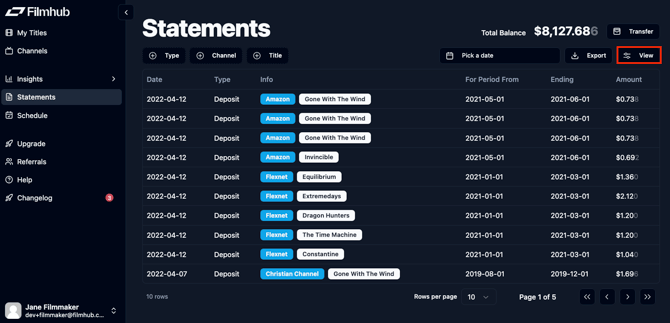
You can toggle visible columns in the **Transactions List** using the **View** tool.
#### Filtering Transactions
You can use the filters above the **Transactions List** to filter your transactions by **Type, Channel, Title, and Date**. You can select multiple values within each filter. You can remove a filter by unchecking the box.
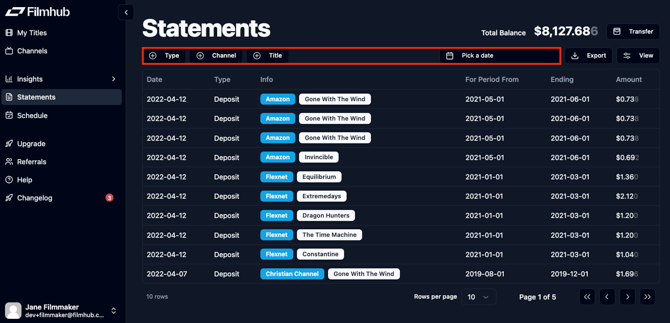
- **Type**: Click the drop-down menu and select transaction types to filter by.
- **Credit:** Any transaction that increases your account balance
- **Debit:** Any transaction that decreases your account balance
- **Transfer request:** Any pending transfer requests
- **Individual Transaction Types**: [As defined above.](https://help.filmhub.com/statements-transactions-and-transfers?hsLang=en#Transactionslist)
- **Channel:** Type at least two letters to search for a channel and click to add it to the filter.
- **Title(s):** Type at least two letters to search for a title and click to add it to the filter.
- **Date:** Click **Pick a date** and select any date from the dropdown calendar. You can select two dates to filter by date range. Click the date again to remove it as a filter.
#### **Exporting and Downloading Your Statements**
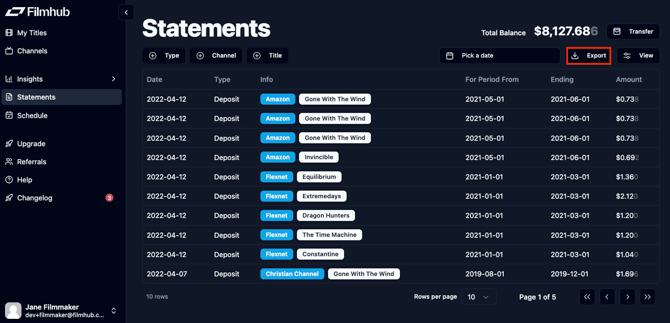
Statements can be downloaded from your dashboard at any time. Click **Export** to download your statements as a CSV, with any filters you've applied still in place.
Your CSV export includes both:
- **Gross earnings** (before Filmhub's commission)
- **Net earnings** (after Filmhub's commission)
### Transfers
#### Completing Your Tax Info
Before you can transfer your earnings, you are required to [complete your tax information.](https://help.filmhub.com/account-settings?hsLang=en)
#### Transferring your earnings
.png?width=670&height=336&name=image%20(19).png)
If your total balance is positive, you can transfer your earnings immediately with no holdback periods. To initiate a transfer:
1. Click **Transfer**.
2. Review your transfer details:
- **Balance:** Your total earnings balance
- **Tax to Be Withheld:** Filmhub may be legally required to withhold taxes on your earnings. [Learn more here.](https://help.filmhub.com/articles/2663756-tax-withholding?hsLang=en)
- **Transfer fee:** The PayPal-charged fee to process your transfer. Filmhub does not add anything on top of this. The fee shown at request time is an estimate based on your declared tax country:
- $0.25 for US accounts
- 2% of the transfer amount (up to $20.00) for non-US accounts. ([view PayPal's full fee schedule](https://www.paypal.com/us/business/paypal-business-fees#statement-10).)
- Note: PayPal actually charges based on your PayPal account's country. If that differs from your tax country on file, the fee may vary slightly, and a small reconciling adjustment in your statements if so.
- **Amount to Be Transferred:** An estimate of what you'll actually receive in your PayPal account, after tax withholding and processing fees.
3. Click **Request Transfer**.
Your earnings will typically arrive in **2–3 business days**. If it's been 5 days and you still haven't received your transfer, please [Contact Support.](https://help.filmhub.com/contact-support?hsLang=en)
.png?width=670&height=336&name=image%20(21).png)
---
### Negative Balances
Occasionally, it is possible to have negative balances in your account. A few reasons you might have a negative balance charge:
- Earnings adjustments found during audits
- You purchased professional services like artwork, captions or video fixes from Filmhub to be billed against future earnings
- Your initial Filmhub deal includes recoupable expenses, which must be earned back before you can receive earnings directly
You must have a positive balance before you can **Transfer** or initiate a Title Takedown.
### Frequently Asked Questions
**Why does my statement say "Transfer (gross)" instead of "Transfer (net)"?**
Transfers initiated before July 1st are labeled Transfer (gross) and include tax. Transfers initiated on or after July 1st are labeled Transfer (net). This is just a labeling change based on transfer date.
**Why is my transfer fee different from what I expected?**
Your transfer fee estimate is based on your declared tax country ($0.25 flat for US accounts, or 2% up to $20 for non-US accounts). However, PayPal actually charges based on your PayPal account's country, if that's different from your tax country on file, you may see a small reconciling adjustment in your statements.
**My transfer shows as "Unclaimed", what do I do?**
Check with PayPal to troubleshoot. If you're still having issues after that, contact [support@filmhub.com](mailto:support@filmhub.com).
**How long does a transfer take?**
Transfers typically arrive within 2–3 business days. If it's been 5 days with no transfer, contact support.
**Why do I have a negative balance?**
A few common reasons: an audit adjustment, purchased Professional Services being billed against earnings, or recoupable expenses from your original deal,. You'll need a positive balance before you can transfer.
**Is there a holdback period before I can transfer my earnings?**
No. As long as your balance is positive, you can transfer immediately with no holdback period.
**Can I download my statements?**
Yes. Click **Export** above the Transactions List to download a CSV with any filters you've applied. The export includes both gross and net earnings.
**What's the difference between gross and net earnings in my export?**
Gross earnings are your total before Filmhub's 20% split is deducted. Net earnings are what's left afterwards.
**How do I filter my transactions by a specific title or channel?**
Use the filter bar above the Transactions List. Type at least two letters in the Channel or Title(s) field to search, then click to add it as a filter. Uncheck the box to remove it.
- [Filmhub Overview](https://help.filmhub.com/filmhub-overview?hsLang=en#main-content)
- [Start Your Filmhub Journey](https://help.filmhub.com/filmhub-overview?hsLang=en#start-your-filmhub-journey)
- [Understand Our Services](https://help.filmhub.com/filmhub-overview?hsLang=en#understand-our-services)
- [Filmhub Dashboard](https://help.filmhub.com/filmhub-dashboard?hsLang=en#main-content)
- [Dashboard Pages](https://help.filmhub.com/filmhub-dashboard?hsLang=en#dashboard-pages)
- [Title Submission Steps](https://help.filmhub.com/filmhub-dashboard?hsLang=en#title-submission-steps)
- [Features & Tools](https://help.filmhub.com/filmhub-dashboard?hsLang=en#features-tools)
- [Filmhub's Distribution Strategies](https://help.filmhub.com/filmhubs-distribution-strategies?hsLang=en)
- [Guides & Resources](https://help.filmhub.com/guides-resources?hsLang=en#main-content)
- [Submitting Your Title](https://help.filmhub.com/guides-resources?hsLang=en#submitting-your-title)
- [Filmhub Requirements and Fixes](https://help.filmhub.com/guides-resources?hsLang=en#filmhub-requirements-and-fixes)
- [QC Review Support](https://help.filmhub.com/guides-resources?hsLang=en#qc-review-support)
- [Best Practices](https://help.filmhub.com/guides-resources?hsLang=en#best-practices)
- [Catalog Import Program](https://help.filmhub.com/guides-resources?hsLang=en#catalog-import-program)
- [FAQs](https://help.filmhub.com/guides-resources?hsLang=en#faqs)
- [Our Recent Subscription Changes: FAQs](https://help.filmhub.com/guides-resources?hsLang=en#our-recent-subscription-changes-faqs)
- [Resources for Rights Holder](https://help.filmhub.com/resources-for-rights-holder?hsLang=en#main-content)
- [Marketing](https://help.filmhub.com/resources-for-rights-holder?hsLang=en#marketing)
- [Resources for Channels](https://help.filmhub.com/resources-for-channels?hsLang=en#main-content)
- [Getting Started](https://help.filmhub.com/resources-for-channels?hsLang=en#getting-started)
- [Finding and Licensing Titles](https://help.filmhub.com/resources-for-channels?hsLang=en#finding-and-licensing-titles)
- [Delivery](https://help.filmhub.com/resources-for-channels?hsLang=en#delivery)
- [Account Management](https://help.filmhub.com/resources-for-channels?hsLang=en#account-management)
- [Legal](https://help.filmhub.com/legal?hsLang=en)
[](http://filmhub.com)
Copyright © 2026, Filmhub